Bands
Low, mids and highs, each with Input, Emphasis and Output. Emphasis rounds and thickens the loud hits in a band while quiet detail stays clean. Type the two split frequencies straight into their windows.
A drum-bus processor: punch, weight, width and a clipper on top, in one rack unit that starts completely neutral.
one licence, two computers
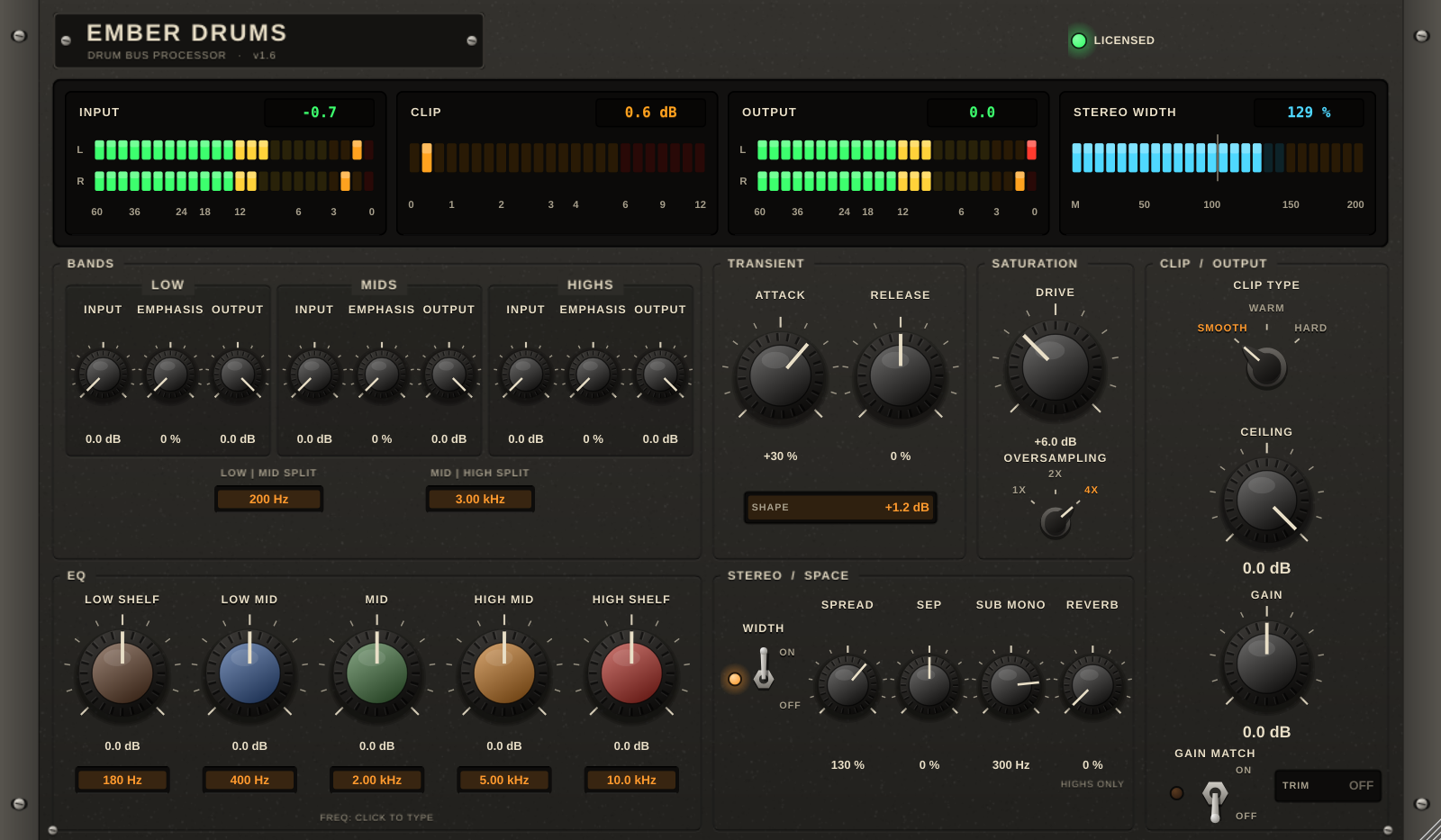
Ember Drums running in your browser on synthesized demo drums, with the plug-in's own curves. Drag a knob up or down, click a frequency window to type, flip the switches.
Six sections on one faceplate, from shaping the hits to catching the peaks.
Low, mids and highs, each with Input, Emphasis and Output. Emphasis rounds and thickens the loud hits in a band while quiet detail stays clean. Type the two split frequencies straight into their windows.
Attack makes hits punchier or softer; Release makes tails and room longer or tighter. Detection is stereo-linked, so the image never shifts, and the Shape window shows the gain change as it happens.
Drive, up to 18 dB, lifts and thickens everything below full scale while full-scale peaks stay put. Oversampling at 1x, 2x or 4x.
Five console-style bands at ±12 dB: low shelf, low mid, mid, high mid and high shelf. Click a frequency window and type 120, 2.5k or 8 kHz.
Spread up to 200 %, Sep to send the width to the highs or the lows, Sub Mono keeping everything below 300 Hz mono by default. Reverb works on the high band only, so kicks and bass stay dry.
Smooth, Warm or Hard clipping and a Ceiling no sample gets past. Gain Match levels the output with the input, so you judge the sound and not the volume.
With every control at its starting position, Ember Drums passes audio through unchanged: flat within 0.01 dB in testing.
The meter bridge shows left and right input and output, how many dB the clipper takes off, and how wide the output is against the input. In testing the width meter read exactly twice the input width with Spread at 200 %.
Measured with the plug-in's own test program; the numbers are in the manual.

The manual covers every control, the curves behind Emphasis, Drive and the transient shaper, and measured results.
The trial is the whole plug-in for 14 days. When it ends, Ember Drums goes quiet for 2 seconds every 45 seconds until you activate a licence. Your projects are never touched.
Your licence key arrives by email. Paste it into the licence panel at the top of the plug-in. How activation works
Soon
Checkout, payment and sales tax are handled by Lemon Squeezy, our online reseller. Prices in US dollars.
No. Ember Drums has its own clipper and ceiling. They suit each other, Ember Drums on the drum bus and Ember Clip on the master, but each is sold separately.
Ember Drums is a VST3 plug-in on Windows and macOS and an Audio Unit on macOS, so it loads in FL Studio, Ableton Live, Reaper, Cubase, Studio One, Bitwig, Logic Pro and most other hosts. There is no AAX version for Pro Tools yet. The trial is the best test: install it in your own setup.
Two at a time. To move to a new computer, click Deactivate this computer in the licence panel on the old one, then activate on the new one. Reinstalling on the same computer does not use up an activation.
Only once, to activate. After that it works offline. About once a month, when you are online, it quietly confirms the licence; if it cannot reach the server it keeps working.
Every control keeps working, but the audio drops out for 2 seconds every 45 seconds. Activate a licence and that stops at once, with no reinstall.
It runs Ember Drums's own curves on the demo beat using your browser's audio engine, so what you hear is close, but it is a preview. The plug-in has its own oversampling filters and handles your full session. Use the free trial to hear it on your music.
Yes, within 14 days of purchase. Please try the free trial first. See the refund policy.