Drive
Input sets how hard you hit the clipper, from -12 to +24 dB. Density lifts quiet detail by up to 6 dB while peaks at the ceiling stay where they are. It works sample by sample, so it never pumps.
A clipper for loud, clean masters. Push the mix into the ceiling and keep the punch, the body and a smooth top end.
one licence, two computers
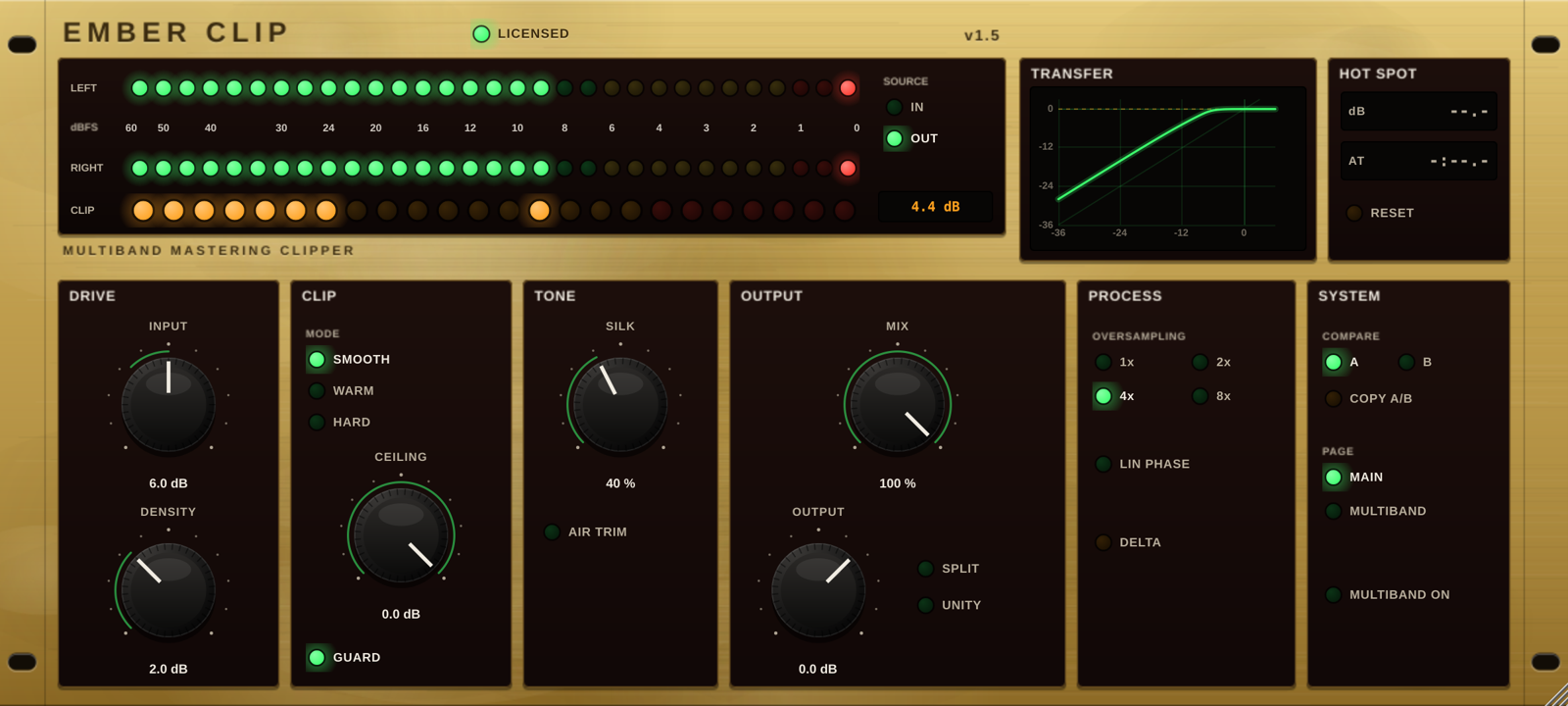
Ember Clip running in your browser on a synthesized demo beat, with the plug-in's own curves. Drag a knob up or down, scroll on it, or use the arrow keys; double-click returns it to its default.
The faceplate is laid out like a rack converter, in the order the signal passes through it.
Input sets how hard you hit the clipper, from -12 to +24 dB. Density lifts quiet detail by up to 6 dB while peaks at the ceiling stay where they are. It works sample by sample, so it never pumps.
Three curves. Smooth stays clean right up to the top, Warm rounds the shoulder earlier with a touch of even-order colour, Hard stops dead for the most punch. Ceiling sets the clip point and Guard makes sure no peak gets past it.
Silk softens the top end only at the moments you push into the ceiling, so the loudest hits stay smooth and the quieter parts stay bright. Air Trim removes ultrasonic clipping products.
Mix blends clipped and original signal, delay- and phase-matched so parallel clipping never combs. Split gives separate dry and wet levels; Unity compares at equal loudness.
Oversampling at 1x, 2x, 4x or 8x, with minimum- or linear-phase filters, reported to your DAW as latency. Delta plays only what the clippers remove, so you can set the drive by ear.
A and B slots for instant comparison. The Hot Spot read-out keeps the biggest clip in the song and the moment it happened, so you can set Input for that exact bar.
Clip the low, mid and high bands on their own before the main clipper. Tame a booming kick without dragging the vocal and hats into the clipper with it.
Each band has Clip, Knee, Mix and Level and its own meter. Clip is level-compensated: it changes how hard the band is clipped, not how loud it is. The crossovers add no latency, and with every band untouched the stage measures flat within 0.05 dB.

The manual covers every control, the formulas behind Density and Silk, and measured latency and aliasing.
The trial is the whole plug-in for 14 days. When it ends, Ember Clip goes quiet for 2 seconds every 45 seconds until you activate a licence. Your projects are never touched.
Your licence key arrives by email. Paste it into the licence panel at the top of the plug-in. How activation works
Soon
Checkout, payment and sales tax are handled by Lemon Squeezy, our online reseller. Prices in US dollars.
No. Each plug-in works on its own and is sold separately. They suit each other: Ember Drums on the drum bus, Ember Clip on the master.
Ember Clip is a VST3 plug-in on Windows and macOS and an Audio Unit on macOS, so it loads in FL Studio, Ableton Live, Reaper, Cubase, Studio One, Bitwig, Logic Pro and most other hosts. There is no AAX version for Pro Tools yet. The trial is the best test: install it in your own setup.
Two at a time. To move to a new computer, click Deactivate this computer in the licence panel on the old one, then activate on the new one. Reinstalling on the same computer does not use up an activation.
Only once, to activate. After that it works offline. About once a month, when you are online, it quietly confirms the licence; if it cannot reach the server it keeps working.
Every control keeps working, but the audio drops out for 2 seconds every 45 seconds. Activate a licence and that stops at once, with no reinstall.
It runs Ember Clip's own curves on the demo beat using your browser's audio engine, so what you hear is close, but it is a preview. The plug-in has its own oversampling filters and handles your full session. Use the free trial to hear it on your music.
Yes, within 14 days of purchase. Please try the free trial first. See the refund policy.